

16 Netflix Alternatives To Keep Streaming Tv (free & paid)

Why People Look for Netflix Alternatives
Streaming has completely changed how people watch TV and movies. Instead of waiting for weekly episodes or sticking to a set broadcast time, you can watch what you want, when you want. For many years, Netflix has been the main choice for this kind of viewing, but it is no longer the only option. In fact, more people are now looking beyond Netflix for their entertainment needs.
One reason is the rising cost of subscriptions. Over time, monthly fees have gone up, and this makes it harder for some households to afford Netflix along with other services.
Another reason is changes in content. Shows and movies don’t stay on one platform forever. A series you started last month might be gone the next month because streaming rights have expired.
Regional content differences also matter. What is available in one country might not be available in another. This can be frustrating for viewers who hear about a show but can’t find it in their own region.
Finally, there’s the desire for variety. Some people want a mix of live channels, others want older classics, and some prefer certain types of films or series. Other platforms can sometimes offer better options for specific tastes.
How to Decide Which Streaming Service Fits Your Needs
The best streaming service for you is not always the most popular one. It depends on how you watch TV, what you like, and what you can spend each month. Here are some important points to help you choose.
Check your internet speed and device compatibility
A good streaming experience depends on a stable internet connection. If your speed is low, choose services that let you lower the video quality so the stream doesn’t stop and start. Also, make sure the app works on your smart TV, phone, tablet, or streaming device before you commit.
Decide if you prefer free or paid content
Free services are supported by ads, which means you will see short breaks during shows and movies. Paid services usually have no ads, but they cost more. If you are willing to watch ads, you can save a lot of money.
Look at the genres you watch most
Not all platforms have the same focus. Some are better for documentaries, others for action films, others for family shows. If you have a favorite genre, pick a service that offers a strong lineup in that category.
Think about family-friendly filters
If you have children at home, it is important to check if the service offers parental controls. Some platforms allow you to set up separate kid profiles with only age-appropriate content.
Keep track of trial periods
Many paid services let you try them for free for a week or even a month. Use this time to see if the selection and quality meet your needs before paying.
Comparison Table: Key Factors to Consider
| Factor | Why It Matters | Example Question to Ask Yourself |
|---|---|---|
| Price | Fits your budget | Can I afford this every month? |
| Genre selection | Matches your taste | Does it have my favorite shows? |
| Device support | Works with your setup | Will it run on my smart TV? |
| Ad-free option | Comfort in watching | Am I okay with ad breaks? |
| Offline viewing | Good for travel | Can I download episodes? |
Free Netflix Alternatives
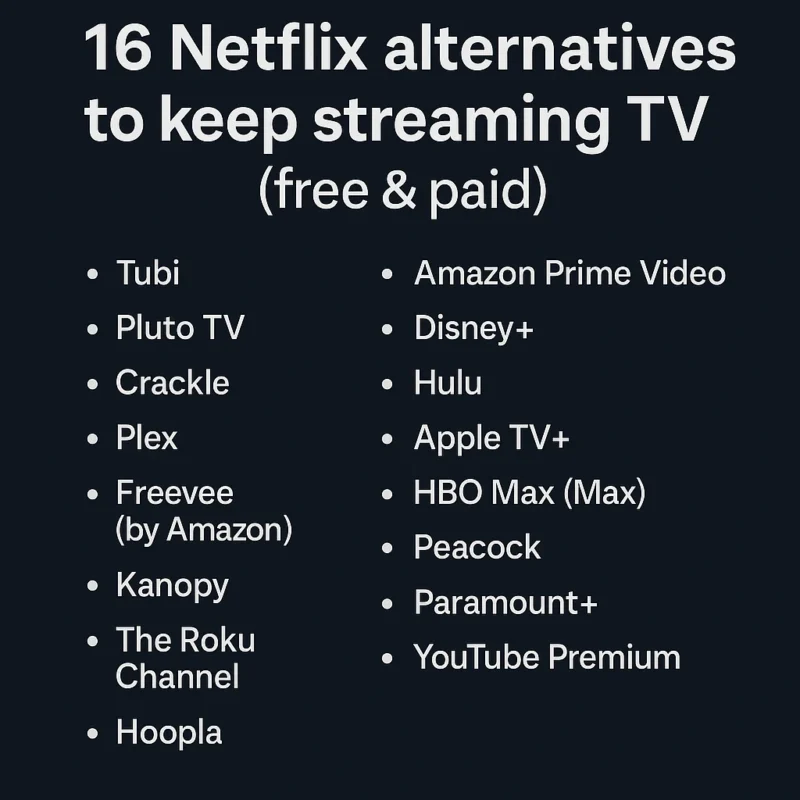
Tubi – Large Free Library With Ads
Tubi is a completely free streaming platform with thousands of shows and movies. It makes money through ads, so you will see commercial breaks, but the content is free to watch. Tubi has categories for almost every genre and even offers a “Hidden Gems” section where you can find less well-known titles that are worth watching.
- Check the “Recently Added” category for new shows and films.
- Add titles to your watchlist so you can easily find them later.
- If you don’t mind ads, you can enjoy hours of free viewing.
Pluto TV – Live TV Channels Without Payment
Pluto TV is different from on-demand streaming. It works like traditional television, with scheduled programming on various channels. You can watch news, movies, reality shows, and even live sports without paying.
Best for:
Viewers who like to turn on the TV and watch whatever is currently airing without scrolling through a library.
Tips:
- Browse the channel guide to see what’s playing.
- Use the search tool if you’re looking for a specific show or movie.
- Great for background viewing while doing other tasks.
Crackle – Free Movies and Originals
Crackle offers a mix of classic films, TV shows, and original programming. It is ad-supported and has a smaller library than some others, but it features unique titles you may not find elsewhere.
Tips:
- Create a free account to save your watch history.
- Use the “Continue Watching” section to pick up where you left off.
- Check the “Crackle Originals” category for exclusive content.
Plex – Free Streaming Plus Personal Library Option
Plex is a versatile service. It offers a library of free movies and shows, plus it lets you stream your own personal media files from your computer to your devices. This makes it useful for people who have a large collection of downloaded content.
Tips:
- Set up a Plex server on your computer to stream your own videos.
- Explore the free live TV channels for extra content.
- Organize your personal files into folders for easy navigation.
Freevee (by Amazon)
Freevee is part of Amazon’s streaming family. It is free to use and supported by ads. It has a good selection of TV shows, films, and original series. If you already have an Amazon account, it’s easy to access.
Standout categories:
- Classic TV shows
- Popular films from the past decade
- Freevee Originals
Kanopy – Free With Library Card
Kanopy is a unique service that works with public libraries and universities. If your local library is partnered with Kanopy, you can stream movies and documentaries for free using your library card.
How to check if you qualify:
- Visit the Kanopy website.
- Search for your local library.
- If it’s listed, sign in with your library credentials.
The Roku Channel – Free Content and Roku Originals
The Roku Channel is available on Roku devices and also through web browsers. It offers a wide range of free movies, TV series, and original content.
Tips:
- Check the “Roku Originals” section for exclusive shows.
- Use the search tool to find hidden series not listed on the home page.
- No account is required to watch.
Hoopla – Another Library-Based Streaming Option
Hoopla works like Kanopy but offers more than just TV and movies. It also has eBooks, audiobooks, and comics. Access is free with a library card from a participating library.
How borrowing works:
- Each library sets a monthly limit on how many titles you can borrow.
- Borrowed titles automatically return after the lending period.
- You can stream instantly or download for offline viewing.